Nie jesteś zalogowany
Aby się zalogować [Kliknij Tutaj] lub skorzystaj z
formularza po lewej stronie w bloku TWOJE MENU
Aby założyć konto [Kliknij Tutaj]


★★★ Premiery ★★★
MENU

Kategorie

Weryfikacja pobierania

Osiągnięto dzienny limit pobrań. Aby kontynuować, potwierdź, że nie jesteś botem.

Po poprawnej weryfikacji pobieranie rozpocznie się automatycznie, a to okno możesz zamknąć.

Odpowiadasz na komentarz:
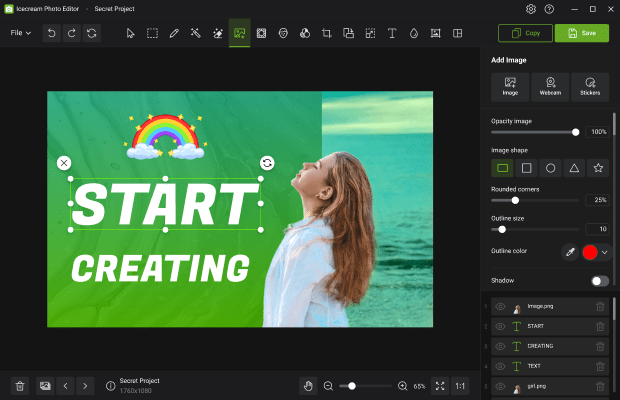
Icecream Photo Editor Pro 1.54 Multilingual + Crack[RepackMaster]
Dodał: OnyHash
Data: 03-03-2026 07:21:12
Rozmiar: 28.11 MB
Seedów: 1
Peerów: 0
Kondycja:
Zaloguj się aby pobrać


Kategoria: Windows
Zaakceptował: Nie wymagał akceptacji
[?] Pokazuje ile razy plik torrent był pobrany z naszego portalu Liczba pobrań: 10
[?] Pokazuje ilość komentarzy wystawionych na naszym portalu Liczba komentarzy: 0
Ostatnia aktualizacja: 03-03-2026 07:21:13

OPIS:


Meet Icecream Photo Editor - the best free photo editor and photo manager for Windows. Edit your pictures like a pro: add text and images, crop and resize, add filters, create collages and more with ease.

Photo Editor’s main features
Completely free photo editor
Icecream Photo Editor is 100% free. No ads, no subscription, no limited features. Draw, add stickers, enhance, blur, add frames, flip and rotate, etc. All at your service at no cost.

Supported image formats
With Icecream Photo Editor one can edit photos and pictures of the most popular formats: JPG, JPEG, PNG, GIF, TIFF and BMP.

Photo manager
With Icecream Photo Editor you can easily organize the photos on your computer. Quickly browse through images in folders, rotate them if necessary, or delete unwanted ones.

Simple photo editor
One of the main advantages of our image editor is its amazing ease of use. Everything you need is always at your fingertips, nothing unnecessary. There is no need to study manuals.

Windows 11 supported
This program works on all major Windows systems, including 11 and 10. Combined with its features and simplicity, this makes it the best photo editor for Windows

Add text to photo
Adding text is easy when you use the Icecream Photo Editor. You can control all the basic parameters - font, size, weight, colors, opacity, etc.

Resize and crop
When editing photos, the most frequently used functions are "Resize Image" and "Crop Image". That’s why we've tried to make them as intuitive as possible.

Add filters and stickers
Pick one of the cool filters to enhance your photo: black and white, old film, fisheye, water colors, and more. Add stickers from our library to make it even better.

Rotate and flip images
Rotate or/and flip your photos in a few clicks with our image editor.

Image enhancement
Use automatic image enhancement to instantly improve your photo. Or use one of the image settings to adjust the image the way you want it.

Blur photos
Easily blur images where needed to give them an artistic touch or hide sensitive data.

Add frames to photo
The free photo editor offers a variety of frames that you can easily add to pictures in a few clicks.

Collage maker
Use one of the many collage presets and create great photo content in a minute.


System Requirements: Windows 7 or later

DETALE TORRENTA: [ Pokaż/Ukryj ]


Komentarze
Aby móc komentować musisz się zalogować