Nie jesteś zalogowany
Aby się zalogować [Kliknij Tutaj] lub skorzystaj z
formularza po lewej stronie w bloku TWOJE MENU
Aby założyć konto [Kliknij Tutaj]


★★★ Premiery ★★★
MENU

Kategorie

Weryfikacja pobierania

Osiągnięto dzienny limit pobrań. Aby kontynuować, potwierdź, że nie jesteś botem.

Po poprawnej weryfikacji pobieranie rozpocznie się automatycznie, a to okno możesz zamknąć.

Odpowiadasz na komentarz:
Fotosizer Professional 3.21.0.594 Multilingual + Key[RepackMaster]
Dodał: OnyHash
Data: 13-12-2025 07:51:32
Rozmiar: 8.05 MB
Seedów: 2
Peerów: 0
Kondycja:
Zaloguj się aby pobrać


Kategoria: Windows
Zaakceptował: StarLordX
[?] Pokazuje ile razy plik torrent był pobrany z naszego portalu Liczba pobrań: 19
[?] Pokazuje ilość komentarzy wystawionych na naszym portalu Liczba komentarzy: 0
Ostatnia aktualizacja: 13-12-2025 07:51:32

OPIS:


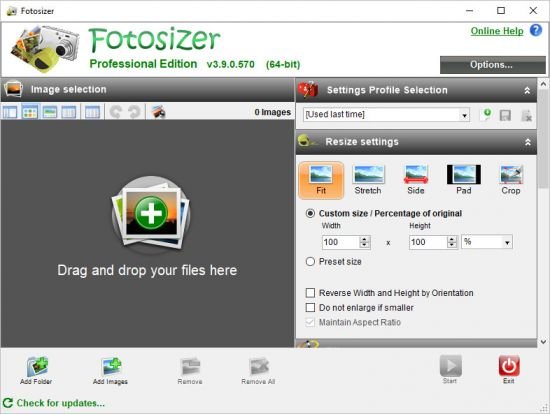
Resize, rotate, rename your photos in batches. Apply your resizing in just 3 easy steps to hundreds of photos at a time.

Batch Resizing and optimization
Easily set resizing options by choosing between resizing modes that correspond to how you want to resize your photos.
Choose to resize by percentage of width and height
Choose to set custom width and height
Resize by choosing one side of the image only and automatically resize the other side.
Make all of your photos the same size regardless of their dimensions by adding padding, using the Pad resize mode.
Maintain aspect ratio
Choose where the resized images will be saved
Resize portrait and landscape photos at the same time.
Resize quickly and easily using a preset list of sizes including iPod, iPhone, and Sony PSP screen sizes.
Crop images.
Apply PNG image optimization.

Easy picture selection
Choose your pictures from Windows File Explorer, using the right-click context menu, then selecting the "Resize with Fotosizer" option.
Choose your pictures you wish to resize using the Add Images button inside Fotosizer.
Choose a folder of pictures using the Add Folder button inside Fotosizer.
Drag and drop your pictures or folders of pictures into the Images selection list in Fotosizer.
Include sub folders when adding from a folder.

Dark display mode
Choose to display Fotosizer using the classic "Light" display mode.
Choose to display Fotosizer using the new "Dark" display mode.

Batch rotation
Flip image vertically
Flip image horizontally
Rotate 90 degrees Counter Clockwise
Rotate 90 degrees Clockwise
Rotate 180 degrees
Auto rotate by Camera orientation information (EXIF) (Professional Edition)

Windows® 11, 10, 8.1, 7
Microsoft .NET Framework 4.7.1+

DETALE TORRENTA: [ Pokaż/Ukryj ]


Komentarze
Aby móc komentować musisz się zalogować